







Frequently asked questions about AI services and Microsoft Copilot | AmeCoda
Questions about AI training, AI e-learning and Microsoft Copilot in Noord Holland, Utrecht and across the Netherlands. Discover how organizations get started with AI and apply it directly in their daily work.
We help organizations apply AI in their work with Microsoft Copilot.
Our services:
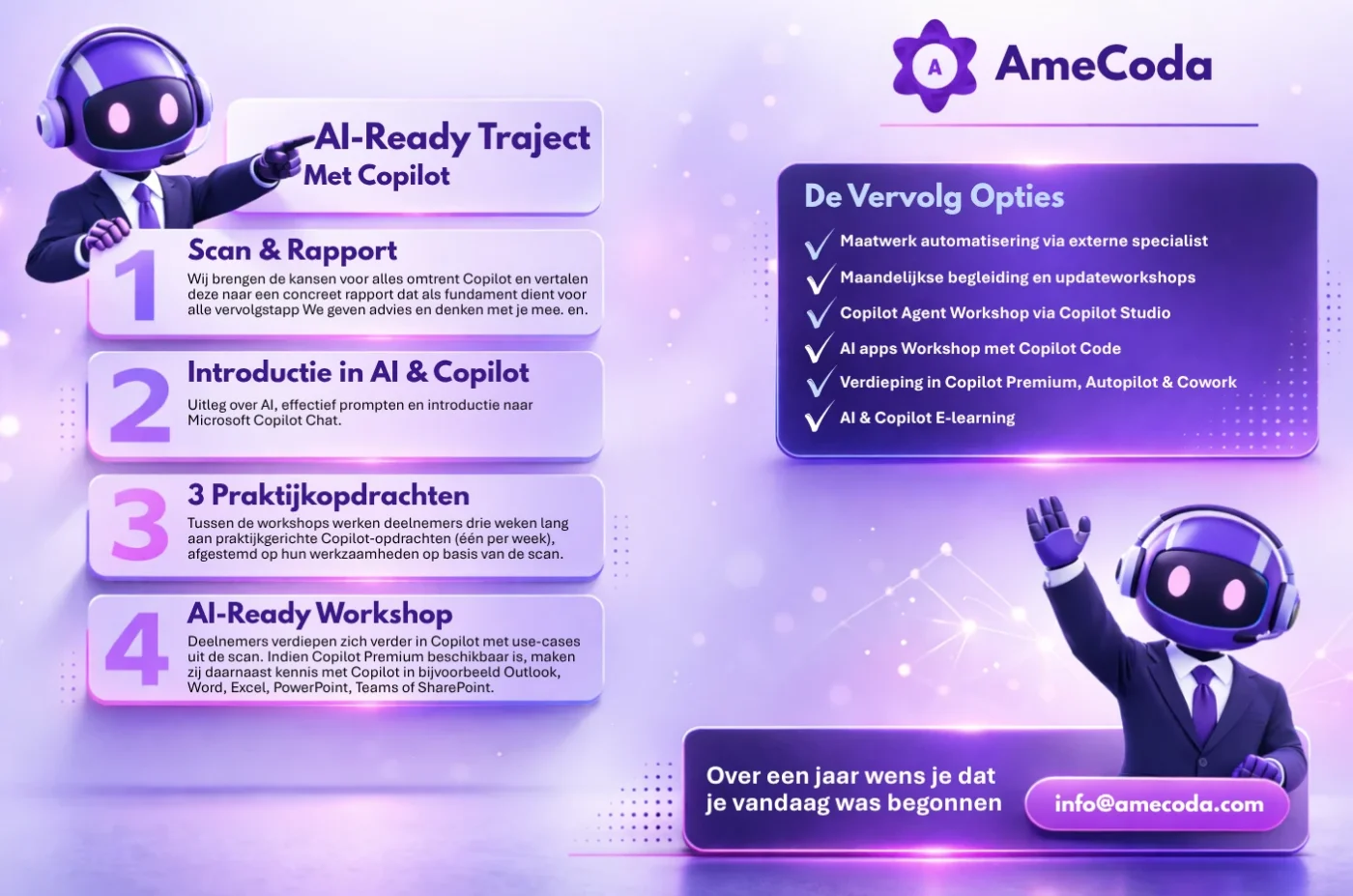
- AI Ready program → AI training for companies with workshops and assignments
- AI e-learning with Copilot (AmeCoda Academy) → online learning with direct application
- Individual workshops and follow-up programs, such as:
- Microsoft Copilot Premium
- Copilot Studio (agents)
The AI-Ready program is our most popular choice. Follow-up options are not included and are purchased separately.
Yes, especially then.
Many organizations recognize the same situation: some employees are already experimenting with AI, while others don't know where to begin. This creates differences in knowledge and AI often remains something individual rather than something for the team.
We provide a clear foundation and guide employees step by step. They learn not only what AI is, but especially how to use Microsoft Copilot in their own work. Think of working more efficiently in Outlook, making faster analyses in Excel, and better collaboration with AI.
Our AI training and Microsoft Copilot workshops are suitable for organizations that want to seriously get started with AI, but are not yet doing so structurally.
We work with:
- SME companies
- Larger organizations and teams
- Companies just starting with AI
- Organizations already using tools, but without a clear direction
Most clients are somewhere between "we're already doing something with AI" and "we want to do this properly." That's exactly where we make the difference.
Because AI implementation is not a tool problem, but a change process.
Many organizations start with AI tools or pilots, but then see that usage doesn't persist. Employees fall back into old ways of working and AI remains stuck in isolated experiments.
Research and practice show that approximately 95% of generative AI projects fail to make real impact. The reason is usually not the technology, but the lack of adoption, structure, and collaboration.
This aligns with the idea from Our Iceberg is Melting: change only works when people understand why, move together, and it becomes part of daily work.
That's why we focus on:
- How teams collaborate with AI
- How to make AI part of processes
- How employees actually continue using it
👉 Read more about this in our blog:
We deliberately work with one ecosystem: Microsoft Copilot (Chat, Premium, and Copilot Studio).
Instead of separate tools, we choose integration in the environment where employees already work. This makes AI not an extra step, but a logical part of daily work.
We make this choice partly because of security. Microsoft Copilot operates within the Microsoft 365 environment, does not train on your data, and can be further configured at the organizational level via the admin panel. For the most current and complete information about the security of Microsoft Copilot Chat and Premium, we refer to the Microsoft website: https://learn.microsoft.com/en-us/microsoft-365/copilot/microsoft-365-copilot-privacy
👉 More about Microsoft Copilot Chat, Premium, and Copilot Studio Agents:
Only in specific cases, such as marketing for images and video, do we use additional tools like Google Gemini (Nano Banana) for images and Google Gemini Veo 3 for video. These tools are currently stronger in this area. Because these are external tools, we place extra emphasis on security and data usage.
We provide AI training, AI workshops, and Microsoft Copilot training throughout the Netherlands.
We work frequently in:
- Noord-Holland (Amsterdam, Haarlem, Alkmaar, Hoorn, West-Friesland)
- Utrecht
- Zuid-Holland (Rotterdam, The Hague)
- Flevoland (Lelystad)
- Friesland (Heerenveen, Leeuwarden)
Our programs are flexible. We provide training on-site, online, or in a hybrid format. This allows us to support both small teams and larger organizations.
👉 Ideal for companies in Noord-Holland looking to start with AI or scale up
The difference is in application.
After a program, we see that employees:
- Actually use AI in their daily work
- Work faster and more efficiently
- Are less dependent on separate tools
- Collaborate better within teams
Where AI was once an experiment, it becomes a permanent part of how people work. And that's where real value is created.
In many cases, we can start quickly. Once your IT team has installed Microsoft Copilot Chat and/or Premium and configured the right settings and security where needed, you can get started almost immediately. In practice, we see this is often arranged in no time.
After a short intake, we determine together where the biggest opportunities lie. Whether you choose the AmeCoda Academy, the AI Ready program, or individual workshops, we can start almost immediately with Microsoft Copilot.
No lengthy implementations, but quickly visible results in practice.
No, we do not handle installation of Microsoft Copilot Chat, Microsoft Copilot Premium, or Copilot Studio ourselves.
This is because every Microsoft environment is different and often has specific security settings and IT guidelines. Many organizations have extra rules around data, access, and compliance, which means installation and activation must be done carefully.
We therefore always recommend doing this together with your internal IT manager or IT partner. They know your Microsoft environment and can activate Microsoft Copilot safely and correctly. In practice, we see this is often arranged in no time.
We then support with:
- Using Microsoft Copilot effectively
- Training and adoption within teams
- Explaining safe and responsible use of Microsoft Copilot
Microsoft Copilot is the umbrella name for all of Microsoft's AI assistants.
- Copilot Chat (also called Copilot Basic): the free business chatbot included with Microsoft 365, comparable to ChatGPT but from Microsoft
- Microsoft 365 Copilot (also called Copilot Premium): the paid, most complete version in Word, Excel, Outlook, PowerPoint and Teams, which works with your information from SharePoint, email and Teams
- Cowork, Copilot Code and Autopilot: add-ons via Copilot Credits
- Copilot Studio: for advanced agents and workflows, on the Microsoft Power Platform
You'll find a detailed explanation on our Microsoft Copilot page: