
Frequently asked questions about Microsoft Copilot AI training and the AmeCoda AI Ready program
The AmeCoda AI Ready program is a practical program that teaches organizations how to use Microsoft Copilot effectively. The program is fully focused on Copilot and helps employees use it safely, responsibly and productively in their daily work. Depending on the organization's Microsoft environment, we work with Microsoft Copilot Chat and can also include Microsoft Copilot Premium in applications such as Word, Excel, PowerPoint, Outlook, Teams and SharePoint.
Microsoft Copilot is the umbrella name. Microsoft Copilot Chat (also called Copilot Basic) is the free foundation included with Microsoft 365 for tasks such as writing, analyzing, summarizing and brainstorming. Microsoft 365 Copilot (also called Copilot Premium) goes further by integrating Copilot directly into Microsoft 365 applications such as Word, Excel, PowerPoint, Outlook, Teams and SharePoint, including basic agents. Copilot Studio is designed for more advanced agents and automation, works with Copilot Credits and runs on the Microsoft Power Platform. Copilot Studio is not part of the standard AI Ready program and is offered as a follow-up workshop.
The AI Ready program is suitable for organizations that want to use Microsoft Copilot practically and responsibly. It can be used by organizations starting with Microsoft Copilot Chat as well as organizations that already use Microsoft Copilot Premium. The program is adapted to the organization's current knowledge level, Microsoft environment and daily workflows.
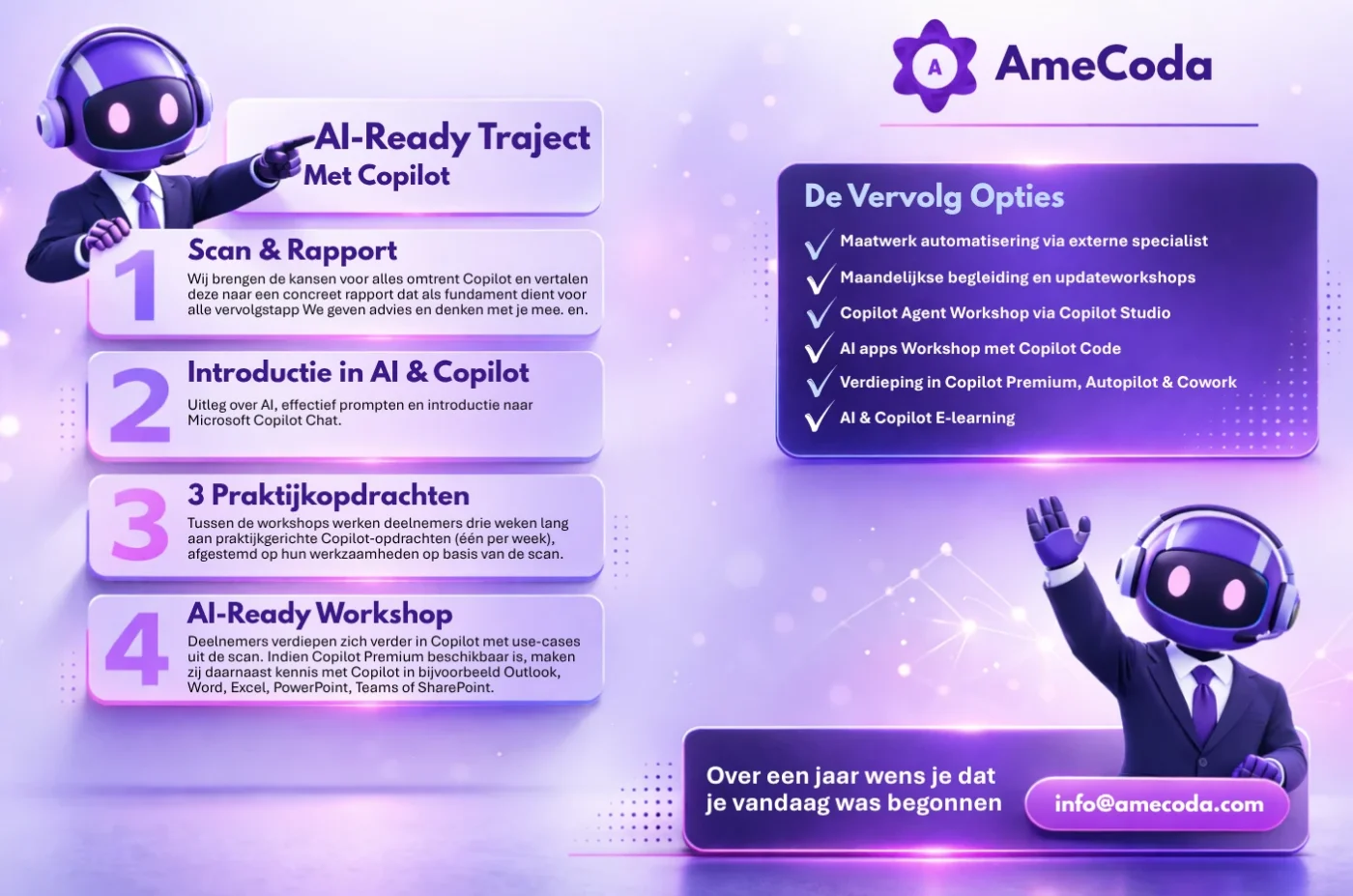
The standard AI Ready program consists of four steps and several contact moments over approximately one month. We combine a Copilot Scan, practical workshops, assignments between sessions and a deeper Copilot session. Depending on the organization, the program can include Copilot Chat, Copilot Premium or a combination of both.
A workshop usually takes around 2 to 3 hours, depending on group size, interaction and the content of the session.
The Copilot Scan helps us identify where Microsoft Copilot can create real value within the organization. We look at workflows, departments, current Copilot usage and employee knowledge. This allows us to tailor the workshops and assignments to the organization and determine where Copilot Chat is sufficient and where Copilot Premium can add value.
Yes. The program can be expanded with additional Microsoft Copilot workshops, deeper Copilot Premium sessions and workshops focused on specific departments or Microsoft 365 applications. More advanced subjects such as Copilot Studio and agents are offered separately as follow-up workshops.
Yes. The program is always adapted to the employees' current knowledge level. Some organizations are just starting with Microsoft Copilot Chat, while others already work with Copilot Premium. We adjust the examples, assignments and workshop level accordingly.
For the best results, we usually recommend groups of approximately 10 to a maximum of 20 participants.
Yes. Many organizations train departments separately, such as sales, HR, finance, marketing or management. This allows the examples, use cases and assignments to closely match each department's daily work.
Yes. When an organization wants to train multiple departments or receive ongoing Microsoft Copilot support, the program can be structured in phases or as an ongoing program. A monthly payment structure can also be discussed.
Yes. In addition to workshops and practical assignments, AmeCoda can provide access to the AI e-learning with Copilot in the AmeCoda Academy. Employees can continue learning and practicing with Microsoft Copilot independently, helping strengthen knowledge and adoption within the organization.
Yes. Copilot Premium does not always need to be a separate follow-up program. If employees already have Microsoft Copilot Premium licenses, we can include it directly in the AI Ready program. We can then cover practical applications within Word, Excel, PowerPoint, Outlook, Teams and SharePoint alongside Copilot Chat.
No. The standard AI Ready program is fully focused on using Microsoft Copilot Chat effectively and, where relevant, Microsoft Copilot Premium within Microsoft 365. Building agents requires additional knowledge and is therefore covered in separate follow-up workshops such as Copilot Studio workshops.
Yes. Once employees have a solid foundation in Microsoft Copilot, organizations can continue with more advanced workshops around Copilot Studio, agents and automation. We deliberately treat these subjects as a next step after the core Copilot program.
Employees learn how to use Microsoft Copilot for practical daily tasks such as writing, summarizing, analyzing, brainstorming and structuring information. When Copilot Premium is available, we can also cover applications within Word, Excel, PowerPoint, Outlook, Teams and SharePoint. Examples and assignments are tailored to the organization wherever possible.
No. Our workshops are practical and interactive. We combine explanations with questions, demonstrations, Mentimeter quizzes and practical assignments. Employees work with situations from their own jobs so that Copilot can be applied immediately.
Yes. The AI Ready program is fully focused on Microsoft Copilot. Depending on the available licenses, we work with Copilot Chat and can include Copilot Premium within Word, Excel, PowerPoint, Outlook, Teams and SharePoint.
Yes. Many organizations continue working with us after the initial program. Microsoft Copilot changes rapidly and new capabilities are introduced continuously. As a Copilot partner, we can continue thinking along with your organization about new applications, best practices, adoption and follow-up workshops.
Yes. Based on the Copilot Scan, workshops and experience with other organizations, we think along with you about relevant use cases, best practices and possible next steps. Final decisions regarding settings, security, access, compliance and technical configuration always remain with your organization and its internal IT team or IT partner.
No. AmeCoda focuses on advice, training, adoption and guidance around Microsoft Copilot. We do not configure the Microsoft environment ourselves.
Every organization has its own security settings, IT policies, access rights and compliance requirements. Technical settings and final configuration decisions therefore remain with your internal IT team or IT partner.